Mobile guide · Updated November 20, 2026
Suzy Says Mobile: Android and iPhone
Suzy Says mobile, the easy way: play the Full version in your phone's browser, on iPhone or Android, with touch controls and no install.
On your phone now? Turn it sideways and play Suzy Says mobile here: about 10 MB, no app, no account.
Play on your phoneWhich phones can play Suzy Says mobile?
There is no Suzy Says iPhone or Suzy Says iPad app, so those play Suzy Says mobile in the browser here. Suzy Says Android players can use the browser too, or an app.
| Phone | Here in your browser | Official app |
|---|---|---|
| iPhone | Yes, the Full version in Safari or Chrome, about 10 MB | None; there is no Suzy Says app on the App Store |
| iPad | Yes, with the same touch controls as on iPhone | None |
| Android phone | Yes, the Full version in Chrome, nothing to install | Free on Google Play, Android 11 or newer, contains ads |
| Story Mode and Endless Mode | Both, plus the secret ending | The Play Store listing does not say |
| Account or payment | None | A Google account for the Play Store |
On a Windows PC, Mac or Chromebook, read the Suzy Says download guide instead.
Why play Suzy Says mobile in your browser
Nothing to install
Suzy Says mobile in the browser needs no app store and no APK. Open the page and press Play.
About 10 MB on a phone
Lighter textures for phones make the first load about 10 MB, against about 46 MB on a computer.
The Full version
Story Mode, Endless Mode and the secret ending are all on the title menu: the same Full version that costs $1.50 or more on itch.io.
iPhone, iPad and Android alike
One link works on every phone, so you and a friend can play Suzy Says mobile on different phones.
How to play Suzy Says mobile on iPhone, iPad or Android
There is no iPhone app, so this is how Suzy Says mobile runs on iPhone and iPad. It works the same way on Android.
-
Open suzysays.games and press Play
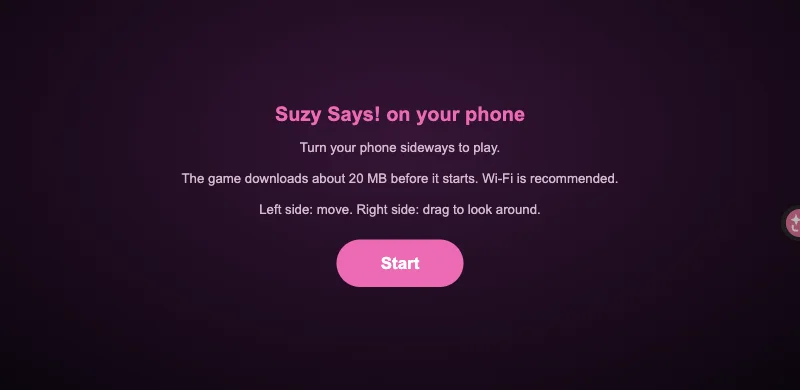
Use Safari or Chrome. The start screen checks your phone first and tells you if memory is tight.
-
Turn your phone sideways
Suzy Says mobile is played in landscape; held upright, the game asks you to rotate.
-
Wait for about 10 MB
A progress bar counts the load. On our Wi-Fi the title menu appeared in about 13 seconds.
-
Add it to your Home Screen
On iPhone, tap Share, then Add to Home Screen. Opened from that icon, Suzy Says mobile fills the screen with no browser bar.
Suzy Says mobile on Android: the Google Play app
On November 18, 2026, MOONBIT, the developer, released Suzy Says on the Google Play store and announced it on the game's itch.io page. The app is free to install, the store lists it as containing ads, and it needs Android 11 or newer.
If your phone meets that and you want an app icon, the Suzy Says Play Store version is the official one. If your Android is older or short on storage, or you want to start now, Suzy Says mobile in your browser here is quicker. Under MOONBIT's announcement, some players say the app lags or closes on phones with little memory.
Skip the Suzy Says APK files on mirror sites. MOONBIT does not post them, and you cannot tell what else is inside. Use Google Play or the browser.
Suzy Says mobile touch controls
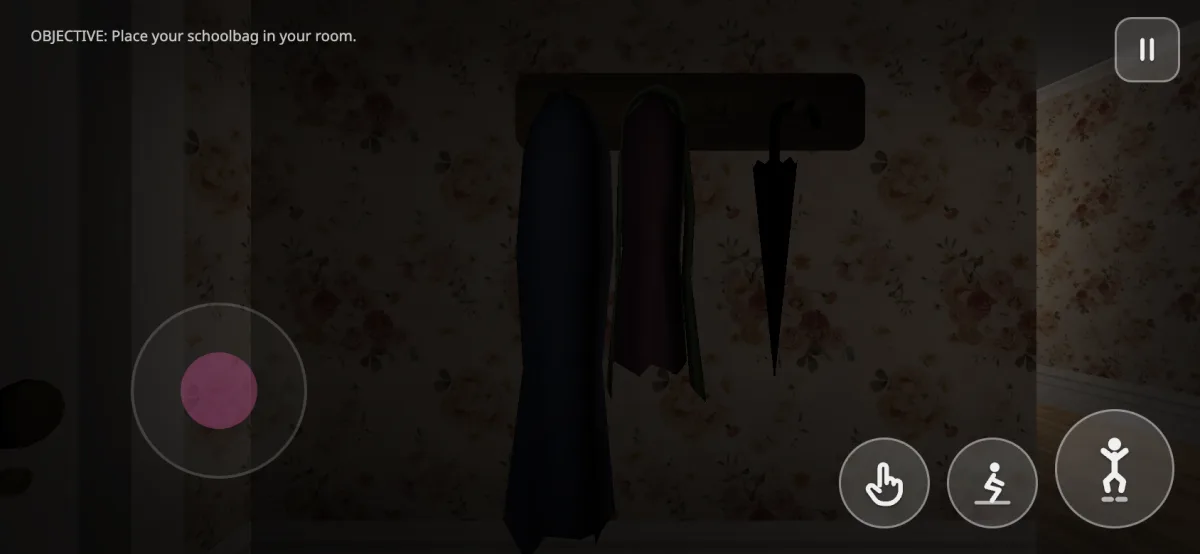
The browser version adds on-screen controls for phones. Each button shows a picture instead of a word.
| Control | Where | What it does |
|---|---|---|
| Joystick | Left half of the screen | Walk; put your thumb anywhere on the left |
| Look | Right half of the screen | Drag to turn and look around |
| Hand button | Bottom right | Use: pick things up and press what you look at |
| Crouching figure | Bottom right | Crouch, the C key on a computer |
| Jumping figure | Bottom right, the big button | Jump, the Space key on a computer |
| Pause | Top right | Opens the pause menu |
Once you can move, learn every command Suzy gives before your first round on the mat.
If Suzy Says mobile lags or closes on your phone
Close other apps first
Other apps and tabs take memory the game needs.
Load it on Wi-Fi once
Later visits load from your browser cache.
Reopen and try again
If the page closes, open it again. The start screen remembers the crash and offers Try again.
Keep Safari or Chrome up to date
The game needs WebGL 2. If your browser lacks it, the start screen says so before anything loads.
How we tested Suzy Says mobile
On November 19, 2026 we played Suzy Says mobile on an iPhone in Safari on this site: the title menu, Story Mode and the touch controls all worked, and the first load was about 20 MB (about 10 MB since November 20). For the Android app we read the Google Play listing and MOONBIT's itch.io announcement.
Limits: we tested one iPhone, not yet a real Android phone, and did not install the Android app, so we do not rate it. Phones with less memory may lag.
Suzy Says Mobile FAQ
Is there a Suzy Says mobile app?
On Android, yes: MOONBIT released a free app on Google Play on November 18, 2026. There is no iPhone or iPad app. On any phone you can also play the Full version here in the browser.
Is Suzy Says on iPhone?
Not on the App Store. On iPhone, Suzy Says mobile means the browser: open this site in Safari, press Play and turn the phone sideways.
Is the Android version free?
It is free to install, and the Play Store lists it as containing ads. The browser version here is free too, with nothing to install.
Should I download a Suzy Says APK?
No. APK mirror sites are not MOONBIT. Get the app from Google Play, or play in your browser here.
Does Suzy Says mobile have Endless Mode?
The browser version on this site does: it is the Full version with Story Mode, Endless Mode and the secret ending. The Play Store listing does not say which modes the app has.
Play Suzy Says mobile now
Turn your phone sideways and play the Full version in your browser: about 10 MB, no app.
Play Suzy Says